I listed an item for $250 on Facebook Marketplace. Within a day I had a buyer. They messaged me saying they were out of state, military, couldn't pick up in person, and wanted to pay via Venmo. Standard stuff. I said sure.
Then the fake Venmo email showed up in my inbox.
I can see exactly how someone would fall for this. What initially disarmed me was the buyer's profile picture. A little old man, completely benign. That image set a tone. Then the email arrived and something felt off. If you look at the screenshot above, you can see it: the word "Paid" has a black and blue highlight around it that doesn't match anything in Venmo's real UI. That kind of artifact shows up when someone screenshots or pastes a UI element from somewhere else into an email template. It's subtle, but it's there. When I checked the sender address, that confirmed it. The scam works in layers: the profile picture lowers your guard, the email looks close enough to pass a quick glance, and only if you slow down do the cracks show.
The Setup
The playbook is simple and it works because it mimics something totally normal. Here's how it unfolded:
- I listed an item for $250 on Facebook Marketplace.
- A buyer reached out quickly, said they were out of state (military was the story), and couldn't do a local pickup.
- They asked to pay via Venmo, not unusual, and said they'd send payment right away.
- They followed up saying they tried to send but got an error, and asked for my email address to complete the payment.
- I gave them my email. Minutes later, a fake Venmo payment confirmation landed in my inbox.
That's the social engineering piece most people miss. If there was really a problem with a Venmo payment, Venmo would contact you directly. They don't need your email from the buyer. The buyer asking for your email is the mechanism to deliver the fake confirmation, and handing it over felt completely harmless in the moment. That's what makes it effective.
The Fake Venmo Email
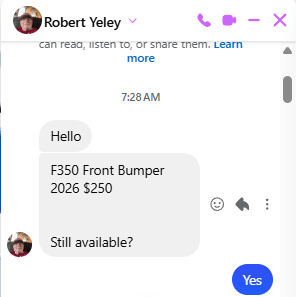
Here is what the initial message looked like. A profile picture of an older man, a friendly greeting, a question about availability. Nothing about this screams scam:
Here is the fake payment confirmation email that followed:
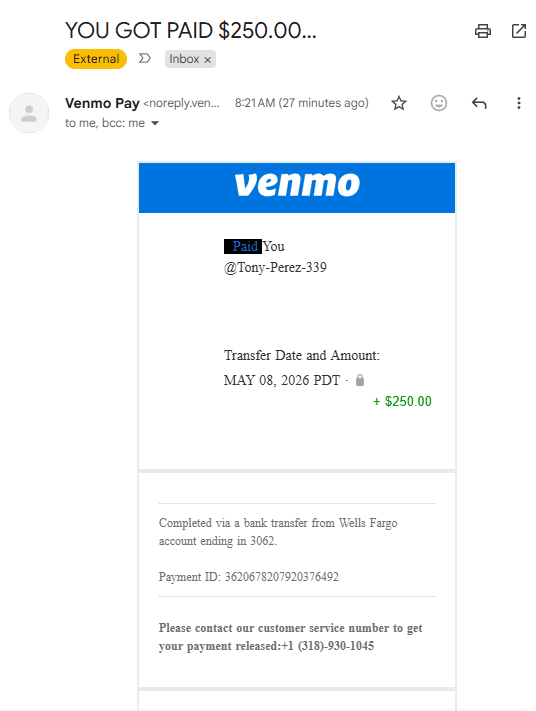
At first glance it looks convincing. Venmo logo, blue branding, your username, the right dollar amount, a bank name, even a payment ID. But there are multiple red flags baked right into the email:
Red Flags in the Email
| Gmail sender address | The email came from noreply.venmopay00@gmail.com, not from venmo.com. Real Venmo emails come from @venmo.com. A Gmail address is a dead giveaway. Gmail even flagged it as "External." |
| "Payment released" requirement | The email says to call a customer service number to get your payment released. Real Venmo payments don't work this way. Once someone sends you money on Venmo, it's in your account. There is no hold, no release, no call required. |
| Suspicious phone number | The number listed (+1 (318)-930-1045) is not a Venmo support line. Venmo doesn't offer phone support for standard transactions. Calling this number is how the scam advances. |
| Fake payment details | They include a fake bank name, last four digits, and a payment ID to make it look real. None of this is verifiable through Venmo, and that's intentional. |
What Happens If You Call
If you call the number, you reach a call center, often overseas. The person on the line will tell you that the $250 payment is on hold because your Venmo account is a personal account and they need to "upgrade" you to a business account to receive the funds. The upgrade costs $300–$500. They'll tell you to send that money first via Venmo, Zelle, CashApp, or gift cards, whatever you'll agree to, and then your original $250 will be released.
It's a classic advance fee scam. You send them money to unlock money that was never real to begin with. If you comply, you're out whatever you sent them and you still don't have a buyer.
In my case, the scammer followed up in the Facebook Marketplace chat asking if I'd received the Venmo confirmation. The script is patient. They wait for you to call before moving to the next step.
What This Type of Attack Is Called
What happened to me is a form of phishing. The term comes from "fishing" — attackers cast a wide net (or in more targeted cases, a very specific lure) hoping someone takes the bait. In this case, the bait was a fake Venmo email designed to look like a payment confirmation from a real service.
More specifically, this falls into a category called payment impersonation phishing. The attacker impersonates a legitimate payment platform (Venmo, PayPal, Zelle, Cash App) and creates a fake notification that mimics what a real one looks like. The goal isn't to steal your login credentials — it's to get you to hand over money directly by convincing you that a payment is being held and you need to act to release it.
The advance fee component — pay $300 to receive your $250 — is one of the oldest fraud mechanics in existence. It's sometimes called a 419 scam or advance fee fraud, named after a section of Nigerian criminal code. The digital version is just a modern delivery mechanism for the same trick.
Phishing by the Numbers
Phishing isn't a niche problem. It is the single most reported cybercrime in the United States, year after year. According to the FBI's Internet Crime Complaint Center (IC3), phishing accounted for nearly 300,000 complaints in a single year — more than any other category of online crime they track. And that's only what gets reported. Most victims never file a complaint.
The FTC reported that American consumers lost over $10 billion to fraud in 2023, the first time that threshold was crossed. Online payment scams and social media fraud were among the fastest-growing categories. The median loss for people who reported losing money to these scams was around $500 — which is not a coincidence when you look at how these advance fee scams are structured. The amount they ask for is calibrated to be painful enough to matter but small enough that victims consider paying it rather than losing the original sale.
These scams disproportionately target regular people doing ordinary things: selling something on Marketplace, buying a concert ticket from a stranger, sending rent to a new landlord. The attack surface is everyday life, which is exactly why awareness matters more than technical sophistication. You don't need to understand cybersecurity to recognize that a payment platform would never ask you to call a number to release your money.
How to Spot This Scam Before It Gets Far
You don't need to be a security expert to catch this. A few habits will stop it cold:
| Check the sender address, not just the display name | Display names can say anything: "Venmo Pay," "PayPal Support," "Amazon." Always click to expand the full sender address. If it's a Gmail, Yahoo, or any address that isn't the company's real domain, it's fake. |
| Log into the app directly | If you get a payment confirmation by email, open the Venmo app or website directly and check your balance. If the payment is real, it will show up there. Don't rely on an email. Go to the source. |
| Never pay to receive a payment | No legitimate payment platform requires you to send money in order to receive money. Full stop. If anyone tells you that you need to pay a fee, upgrade a tier, or cover taxes before funds can be released, it's a scam. |
| Be skeptical of remote buyers who move fast | The out-of-state, can't pick up, military story is a classic Marketplace script. It's not automatic proof of fraud, but combined with a payment that arrives via email rather than actually in your account, walk away. |
| If they tell you to check spam, stop | Venmo, PayPal, and every major payment platform invest heavily in email deliverability. Their transactional emails are engineered to reach your inbox. If a buyer tells you to check your spam folder for the payment confirmation, it's because their email landed there. And it landed there because it is spam. A real payment shows up in the app regardless of what happens to the email. |
| Prefer cash or verified in-app payment | For Marketplace sales, cash in person is still the safest option. If you do use Venmo, verify the payment landed in your app before releasing any item. |
| Meet at a trusted public location | When completing any in-person Marketplace transaction, meet somewhere public and well-lit. Many local police stations have designated safe exchange zones specifically for this. Avoid meeting at your home, a gas station at night, or any location where you'd be isolated. The item isn't worth the risk. |
This Scam Targets Sellers Specifically
Most payment scam awareness focuses on buyers. This one goes after sellers. You're excited someone wants your item, you want to close the deal, and you're already thinking the transaction is done once the email arrives. That urgency and sense of completion is exactly what they're counting on.
The email confirmation is designed to lower your guard at the moment you're most likely to act without thinking. You see "+$250.00" in green and a payment ID and you start packing the item. Then you hit the "please call to release your payment" line and instead of pausing, you just call.
The fix is simple: the email means nothing. Check your Venmo account balance. If the money isn't there, the payment isn't real.
Report It
If you encounter this scam:
- Report the Marketplace listing or message. Use the "Report" option on the buyer's profile or the conversation thread.
- Mark the email as phishing. In Gmail, click the three-dot menu on the email and choose "Report phishing."
- Report to the FTC at reportfraud.ftc.gov.
- Do not call the number. Engaging gives them more information about you and wastes your time.
I know it's tempting to call the number just to mess with them, but the call centers running these operations are professional and they log your number. Not worth it.
The Bottom Line
Selling locally online is still a great way to move stuff you don't need, but the scammers have gotten better at targeting sellers with fake payment confirmations. The tell is always the sender address and the "call us to release your money" line. Real payment apps don't work that way.
Check your actual account balance, not your inbox, before you assume you've been paid.