Agent / Manager Architecture
Proactively monitoring, aggregating and storing server activity (i.e., logs) is important for security professionals. It's the less sexy aspect of security, but having a source of truth for this activity is imperative to understanding what is happening on your servers - especially post-compromise. In fact, if you operate an online store you actually have an obligation to store and manage this activity:Regularly Monitor and Test Networks Requirement 10: Track and monitor all access to network resources and cardholder data Logging mechanisms and the ability to track user activities are critical in preventing, detecting and minimizing the impact of a data compromise. The presence of logs in all environments allows thorough tracking, alerting and analysis when something does go wrong. Determining the cause of a compromise is very difficult, if not impossible, without system activity logs. (Source: Requirements and Security Assessment Procedures, version 3.2.1)
To help with this process I deploy OSSEC in a distributed manner, leveraging its agent and manager architecture. While I have a degree of confidence in my web server deployments, I realize that there is always the threat that I might have missed something. For that reason, I always push my activity to a remote service who has the sole responsibility of managing, aggregating and reporting on all activity across my entire architecture. This provides me the following assurances:-
,
- Reduces the risk that an attacker might try to delete or otherwise modify activity; ,
- Consolidates activity from the entire environment into one record of truth, especially important when managing multiple servers; ,
- Facilitates the creation of synchronized orchestration for the entire stack (i.e., it all works and reports the same);
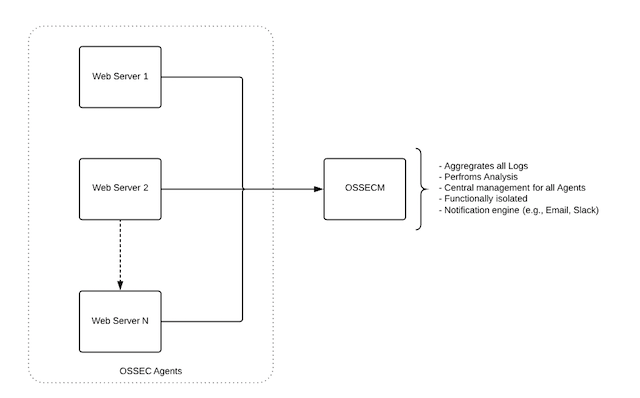
Deploying an Agent / Manager Architecture
If you are running a local implementation of OSSEC you will need to rerun the OSSEC installer. There are ways to hack your way around the configuration, but it's not worth it unless you have a free weekend (it's never just one thing...). On your web server:-
,
- Select your language, the installer will begin. You will set Agent at this point:
OSSEC HIDS r2016-04 Installation Script - http://www.ossec.net

 You are about to start the installation process of the OSSEC HIDS.
 You must have a C compiler pre-installed in your system.
 If you have any questions or comments, please send an e-mail
 to dcid@ossec.net (or daniel.cid@gmail.com).

  - System: Linux
  - User: root
  - Host:


  -- Press ENTER to continue or Ctrl-C to abort. --


1- What kind of installation do you want (server, agent, local or help)? agent
-
,
- The next step is to provide the IP of your manager, if you don't know it at the time of installation that's ok. You can always update the IP in your ossec.conf file.
OSSEC HIDS r2016-04 Installation Script - http://www.ossec.net

 You are about to start the installation process of the OSSEC HIDS.
 You must have a C compiler pre-installed in your system.
 If you have any questions or comments, please send an e-mail
 to dcid@ossec.net (or daniel.cid@gmail.com).

  - System: Linux
  - User: root
  - Host:


  -- Press ENTER to continue or Ctrl-C to abort. --


1- What kind of installation do you want (server, agent, local or help)? agent

  - Agent(client) installation chosen.

2- Setting up the installation environment.

 - Choose where to install the OSSEC HIDS [/var/ossec]:

    - Installation will be made at  /var/ossec .

3- Configuring the OSSEC HIDS.

  3.1- What's the IP Address of the OSSEC HIDS server?:

   - Adding Server IP
-
,
- Follow the instructions, setting your configuration options. Once done, the final step will be pressing Enter on your keyboard to complete the installation.
# /var/ossec/bin/manage_agents

****************************************
* OSSEC HIDS v2016-04 Agent manager. *
* The following options are available: *
****************************************
(A)dd an agent (A).
(E)xtract key for an agent (E).
(L)ist already added agents (L).
(R)emove an agent (R).
(Q)uit.
Choose your action: A,E,L,R or Q:
You want to add a new Agent, so enter A into the input field. It will then ask you a series of questions, this is where you want to give some thought to your naming convention. For instance, see below:
****************************************
* OSSEC HIDS v2016-04 Agent manager.     *
* The following options are available: *
****************************************
   (A)dd an agent (A).
   (E)xtract key for an agent (E).
   (L)ist already added agents (L).
   (R)emove an agent (R).
   (Q)uit.
Choose your action: A,E,L,R or Q: a

- Adding a new agent (use '\q' to return to the main menu).
  Please provide the following:
   * A name for the new agent: pb.webserver1
   * The IP Address of the new agent: any
   * An ID for the new agent: 01001
Agent information:
   ID:01001
   Name:pb.webserver1
   IP Address:any

Confirm adding it?(y/n): y
What you see is I use the PB (perezbox) to identify servers I'm responsible for (assume maybe you have managing servers aren't yours) and I apply a naming convention for each web server (e.g., webserver1). I could choose to make it more descriptive (maybe, use the name of the domain on that server).
Note: I select ANY for the "IP Address of the new agent" this is intentional. I have found this to be more effective than explicitly defining the IP of the agent server.
If everything looks good, select Y. If all is successful, it'll look something like this - asking you what you want to do next:Agent added. **************************************** * OSSEC HIDS v2016-04 Agent manager. * * The following options are available: * **************************************** (A)dd an agent (A). (E)xtract key for an agent (E). (L)ist already added agents (L). (R)emove an agent (R). (Q)uit. Choose your action: A,E,L,R or Q: eIn our case, we want to extract the key for the new agent. So we type E.
Available agents:
   ID: 01001, Name: pb.webserver1, IP: any
   ID: 01002, Name: pb.webserver2, IP: any
Provide the ID of the agent to extract the key (or '\q' to quit): 01001

Agent key information for '01001' is:
Now you want to switch to the AGENT server and copy that key over to that server. You do this by navigating to the Manage Agents application on the Agent server:
# /var/ossec/bin/manage_agents


****************************************
* OSSEC HIDS v2016-04 Agent manager.     *
* The following options are available: *
****************************************
   (I)mport key from the server (I).
   (Q)uit.
Choose your action: I or Q:
Select the I (Import) option. This will give you the opportunity to copy the key over to the new agent, and will confirm the data:
* Provide the Key generated by the server.
* The best approach is to cut and paste it.
*** OBS: Do not include spaces or new lines.

Paste it here (or '\q' to quit):


Agent information:
   ID:01001
   Name:pb.webserver1
   IP Address:any

Confirm adding it?(y/n):
You'll notice that when you enter the key it will display the agent information you set on the manager, use this opportunity to confirm the configuration. Now you want to restart the Agent server, before you do run a TAIL command on the manager server to monitor if the agent is sending information. You can do this by looking at the ossec.log file or the alerts.log. I will monitor the alerts.log file for any references of pb.webserver1:
tail -F /var/ossec/logs/alerts/alerts.log | grep "pb.webserver1"Once I'm reading on the manager, I'll start the OSSEC agent. The output will look like this:
# /var/ossec/bin/ossec-control start
Starting OSSEC HIDS r2016-04 (by Daniel B. Cid)...
Started ossec-execd...
Started ossec-agentd...
Started ossec-logcollector...
Started ossec-syscheckd...
Completed.
On the agent you're looking for this:
2018/11/30 19:22:42 ossec-agentd(4102): INFO: Connected to the server (your manager IP address).And on the server you're looking for this:
** Alert 1543605762.8214223: mail  - ossec,
2018 Nov 30 19:22:42 (pb.webserver1) any->ossec
Rule: 501 (level 3) -> 'New ossec agent connected.'
ossec: Agent started: 'pb.webserver1->any'.
And with that, you are all set with your new OSSEC deployment.,