So I have been playing with a number of tools lately and this was perhaps one of the easiest things I couldn't figure out. Talk about having a "WTF" moment.
If you're curious,
wpscan is a vulnerability scanner designed to pentest WordPress applications. It has a number of features that allow you to enumerate usernames, plugins, and TimThumb files. I'll actually be demonstrating the tool this weekend at
WordCamp Las Vegas. As for
BackTrack its a Linux distribution also designed for pentesters. If you're interested more in malware reverse engineering then you might want to look at the
REMnux linux distribution. In any event, that's a subject for another day...
WPSCAN came pre-configured with BackTrack but as you might expect, it was out of date. So naturally I tried their update option:
#ruby ./wpscan.rb --update
When you do, on a clean install, you're likely greeted with the following:
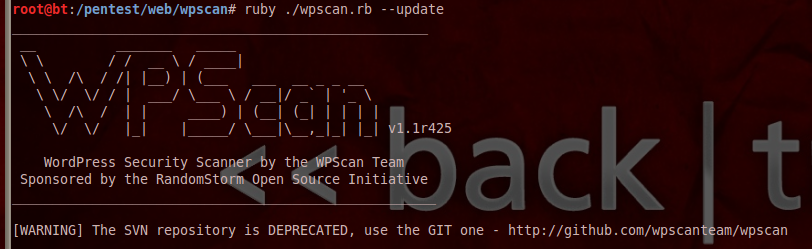
AWESOME! Now what?!?!
Fortunately the image shows you where to get the latest build:
https://github.com/wpscanteam/wpscan
But the question I had was still the same, how do I get the git build onto my box and replace what I have already configured? As you might imagine it was actually very simple, thanks to
@gbrindisi for the assist.
First thing you want to do is remove the install, it'll be here:
# rm -rf /pentest/web/wpscan
Second, you'll download the build and clone it to the same directory you just removed:
# git clone https://github.com/wpscanteam/wpscan.git /pentest/web/wpscan/
With the latest build the
--update should now work, so you'll only need to run this moving forward:
# ruby ./wpscan.rb --update
Thanks again to the WPSCAN team for a job well done.
Cheers.,